

Overview
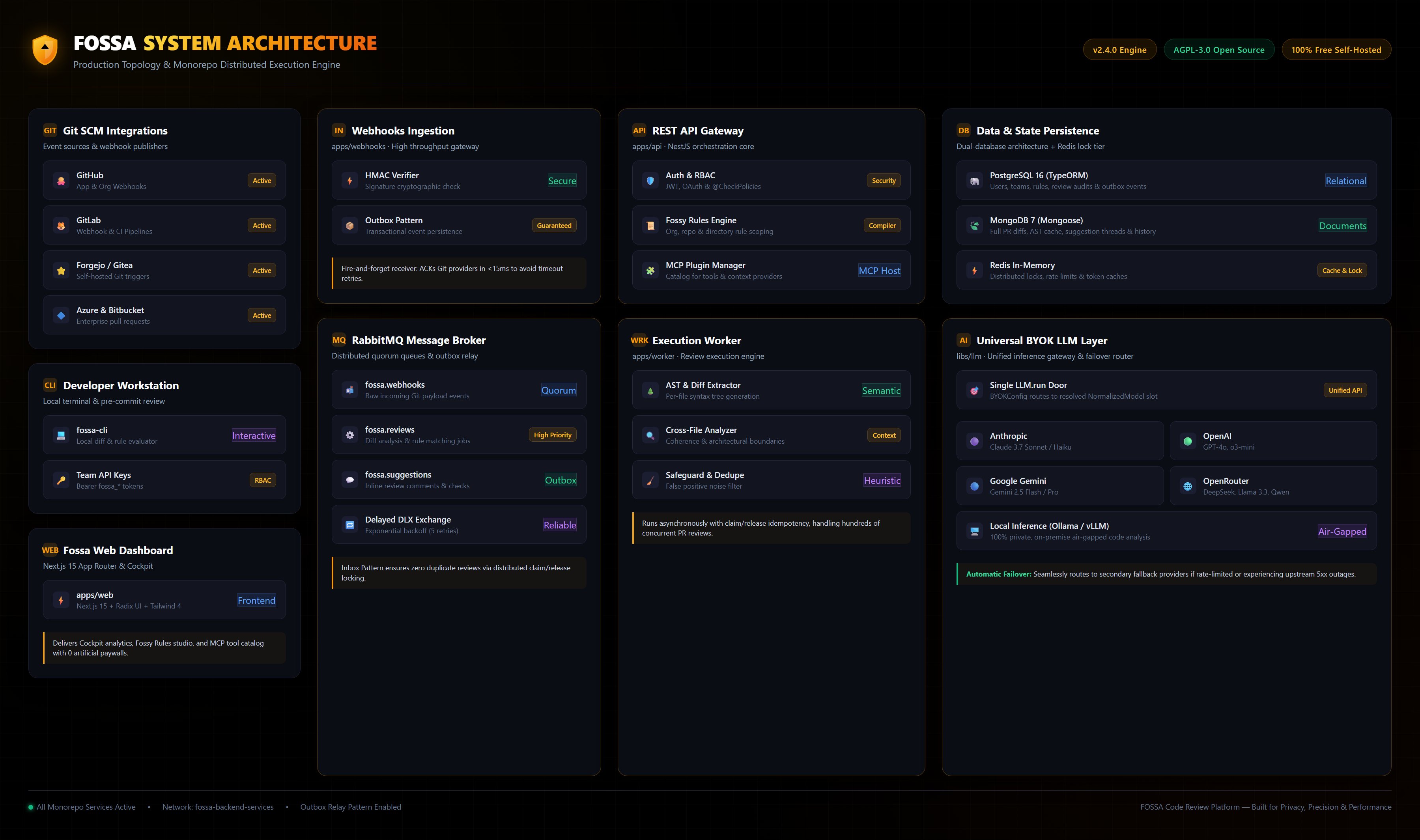
This document outlines the architecture powering Fossa’s infrastructure. Our system is built on a distributed architecture that leverages containerization and network segmentation to ensure maximum scalability, security, and maintainability.Networks and Key Components
The infrastructure is divided into Docker networks that separate public access from internal service traffic:- shared-network: Public-facing services and edge routing
- fossa-backend-services: Internal service-to-service communication
- monitoring-network: Metrics and observability traffic (optional)
Components
1. Fossa Web Application
Our frontend platform is built with Next.js, delivering a seamless user experience through direct communication with our API layer.2. Core Backend Services
The 2.0 stack splits backend responsibilities into dedicated services:- API: Central service layer handling business logic and request processing
- Worker: Asynchronous processing for queues and background jobs
- Webhooks: Dedicated service for Git provider webhooks
- Analytics Worker: Ingestion worker (
WORKER_ROLE=analytics) that powers the Cockpit dashboards.
3. MCP Manager
MCP Manager catalogs providers and integrations, then exposes them to Fossa so teams can install MCPs from the Plugins screen.4. Data Stores
Fossa uses two databases:- Postgres: Relational data and embeddings metadata
- MongoDB: Flexible document storage
5. Messaging and Observability
RabbitMQ is required for 2.0, providing reliable asynchronous communication between API, worker, and webhooks. Prometheus and Grafana are optional and used for monitoring and visualization.6. Fully Autonomous & Self-Contained
Fossa is 100% free, self-hosted, open-source software under the AGPL-3.0 license. There are no closed-source billing dependencies or cloud-only paywalls: every capability—including DORA metrics analytics in Cockpit, Fossy Rules, universal multi-provider BYOK LLM routing, and MCP plugins—executes entirely within your own self-hosted infrastructure.Next Steps
Run Fossa Locally
Ideal for local development and getting familiar with the full Fossa stack.
Deploy Fossa to Production
Perfect for production deployment and experiencing the full capabilities of Fossa.